# Starlake: Open Source Data Loading & Transformation Platform
> Discover how Starlake revolutionizes data pipelines with its declarative tool for seamless data loading, transformation and orchestration.
**Starlake** is an enterprise-grade data pipeline tool that transforms how organizations handle data integration. It allows Data Engineers to build robust pipelines using **YAML and SQL** instead of complex Python or Scala code.
> "Starlake is to Data Pipelines what Terraform is to Infrastructure."
## Why Choose Starlake?
- **100% Declarative**: No Orchestration code to write.
- **Automated Quality**: schema validation and data quality checks are built-in.
- **Cross-Platform**: Run on Spark, Snowflake, BigQuery, Databricks, DuckDB, PostgreSQL and more

## What is Declarative Data Engineering?
**Declarative Data Engineering** is a paradigm shift where you describe _what_ you want your data pipeline to do, rather than writing the code for _how_ to do it.
Starlake implements this by allowing you to define your load and transform tasks in **YAML**, and then automatically generating the necessary orchestration code. This acts like "Terraform for Data Pipelines."
Using an YAML declarative syntax, describe your load and transform tasks and let Starlake automatically generate your orchestration code.
### How does Starlake extract data?
Starlake provides a **zero-code extraction** capability. You define your data sources in YAML, and Starlake handles the complexity.
Key extraction features:
- **Universal Connectivity**: Support for any JDBC compliant database.
- **Smart Loading**: Native support for incremental and full loads.
- **Auto-Evolution**: Automated handling of schema changes in source data.
[Learn more about Declarative Extract](guides/extract/tutorial)
How it works:
Let's say we want to extract data from a Postgres Server database on a daily basis
```yaml
extract:
connectionRef: "starbake" # or mssql-adventure-works-db i extracting from SQL Server
jdbcSchemas:
- schema: "sales"
tables:
- name: "order_lines" # table name or simple "*" to extract all tables
#partitionColumn: "salesorderdetailid" # (optional) you may parallelize the extraction based on this field
#fetchSize: 100 # (optional) the number of rows to fetch at a time
#timestamp: salesdatetime # (optional) the timestamp field to use for incremental extraction
tableTypes:
- "TABLE"
#- "VIEW"
#- "SYSTEM TABLE"
#- "GLOBAL TEMPORARY"
#- "LOCAL TEMPORARY"
#- "ALIAS"
#- "SYNONYM"
```
That's it, we have defined our extraction pipeline.
Visit our [extraction user guide](guides/extract/tutorial) to learn more
### How does Starlake load data?
Starlake transforms data ingestion into a purely configuration-based process.
Key loading features:
- **Multi-Format Support**: CSV, TSV, JSON, XML, Fixed-width, Parquet (and Avro via Spark).
- **Quality & Security**: Automated data quality validation and privacy/encryption controls.
- **Warehouse Native**: Optimized loading for all major data warehouses with row-level security.
[Learn more about Declarative Load](guides/load/tutorial)
Let's say we want to load the data extracted from the previous example into a datawarehouse
```yaml
---
# this yaml file has been automatically generated by infer-schema command
table:
pattern: "order_lines.*.psv" # This property is a regular expression that will be used to match the file name.
schedule: "when_available" # (optional) cron expression to schedule the loading
metadata:
format: "DSV" # (optional) auto-detected if not specified
encoding: "UTF-8"
withHeader: yes # (optional) auto-detected if not specified
separator: "|" # (optional) auto-detected if not specified
writeStrategy:
type: "UPSERT_BY_KEY_AND_TIMESTAMP"
timestamp: signup
key: [id]
# Please replace it by the adequate file pattern eq. customers-.*.psv if required
attributes: # Description of the fields to recognize
- name: "productid" # attribute name and column name in the destination table if no rename attribute is defined
type: "string" # expected type
required: false # Is this field required in the source (false by default, change it accordingly) ?
privacy: "NONE" # Should we encrypt this field before loading to the warehouse (No encryption by default )?
ignore: false # Should this field be excluded (false by default) ?
- name: "sale_date" # second attribute
type: "timestamp" # auto-detected if not specified
- name: "unitprice"
type: "float"
...
```
That's it, we have defined our loading pipeline.
Visit our [load tutorial](guides/load/tutorial) to learn more.
### How does Starlake transform data?
Simplify transformations by combining **YAML** configuration with standard **SQL**.
Key transformation features:
- **Standard SQL**: Write plain SELECT statements without complex templating logic.
- **Auto-Lineage**: Automatic detection of column and table-level lineage.
- **Incremental Processing**: Built-in support for processing only new or changed data.
[Learn more about Declarative Transform](guides/transform/tutorial)
Let's say we want to build aggregates from the previously loaded data
```yaml
task:
writeStrategy:
type: "UPSERT_BY_KEY_AND_TIMESTAMP"
timestamp: signup
key: [id]
```
```sql
SELECT # the SQL query will be translated into the appropriate MERGE INTO or INSERT OVERWRITE statement
productid,
SUM(unitprice * orderqty) AS total_revenue
FROM order_lines
GROUP BY productid
ORDER BY total_revenue DESC
```
Starlake will automatically apply the right merge strategy (INSERT OVERWRITE or MERGE INTO) based on `writeStrategy` property and the input /output tables .
Visit our [transform tutorial](guides/transform/tutorial) to learn more
### How does Starlake test data?
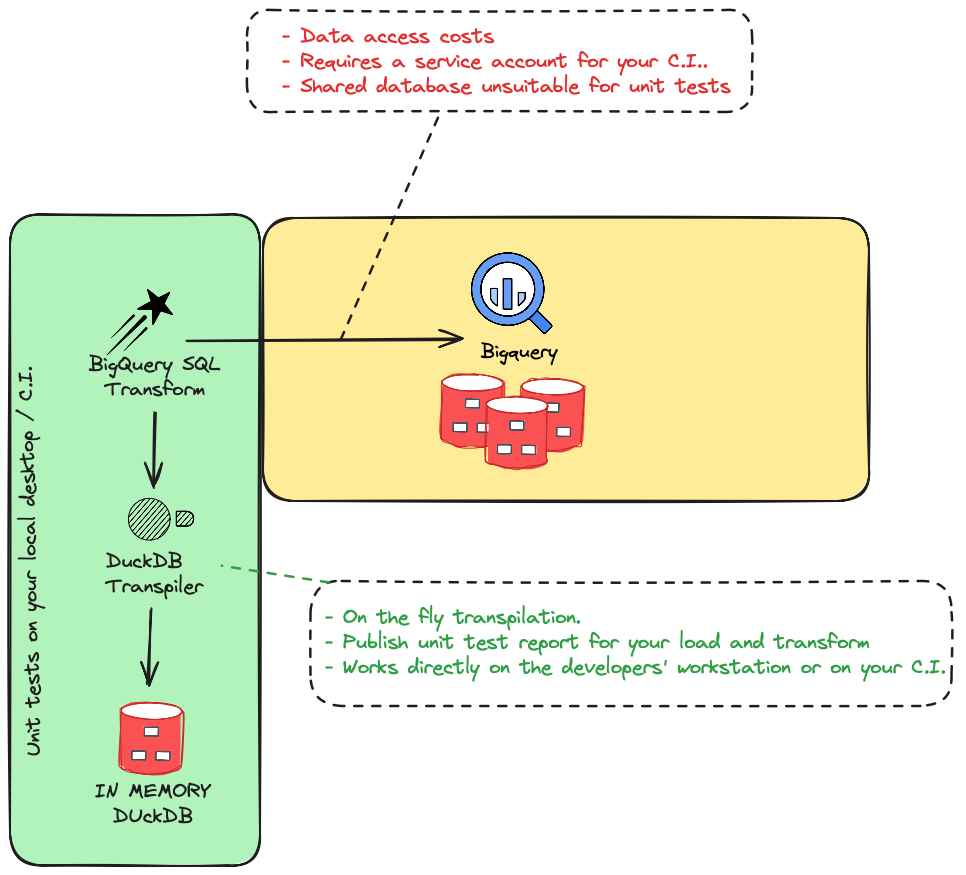
Starlake allows you to run your production load and transform logic on a local **DuckDB** instance, enabling fast, cost-effective unit testing.
[Learn more about Declarative Tests](guides/unit-tests/concepts)
In the example below, we run a test to validate the load task on the table sales.order_lines.
```sh
.
├── load
│ ├── sales
│ │ └── order_lines
│ │ └── test_order_lines_with_10_orders
│ │ ├── _expected_10_orders.sql # SQL request to run against the target table
│ │ ├── _expected_10_orders.json # expected data when expected_10_orders.sql is run on the target table
│ │ └── _incoming.sales_orders_lines.json # test data
```
Visit our [test tutorial](guides/unit-tests/concepts) to learn more
### Does Starlake support orchestration?
Automate your entire data pipeline:
Starlake automatically analyzes the dependencies between your SQL tasks and generates the corresponding DAGs (Directed Acyclic Graphs).
These DAGs are built using either predefined or custom templates, giving you the flexibility to support any orchestration scenario.
All you need to do is specify the DAG template you want Starlake to use for your load and transform tasks.
```yaml
dag:
comment: "dag for loading all {{domain}} tables"
template: "load/airflow__scheduled_table__shell.py.j2" # Select one of the pre-existing templates
filename: "airflow_{{domain}}_tables.py"
```
Define your transform DAG template
```yaml
dag:
comment: "dag for transforming domain {{domain}} with schedule {{schedule}}"
template: "transform/airflow__scheduled_task__shell.py.j2"
filename: "airflow_{{domain}}_{{schedule}}_tasks.py"
```
Visit our [orchestration tutorial](guides/orchestrate/tutorial) to learn more
## Multi-engine & Cross-engine
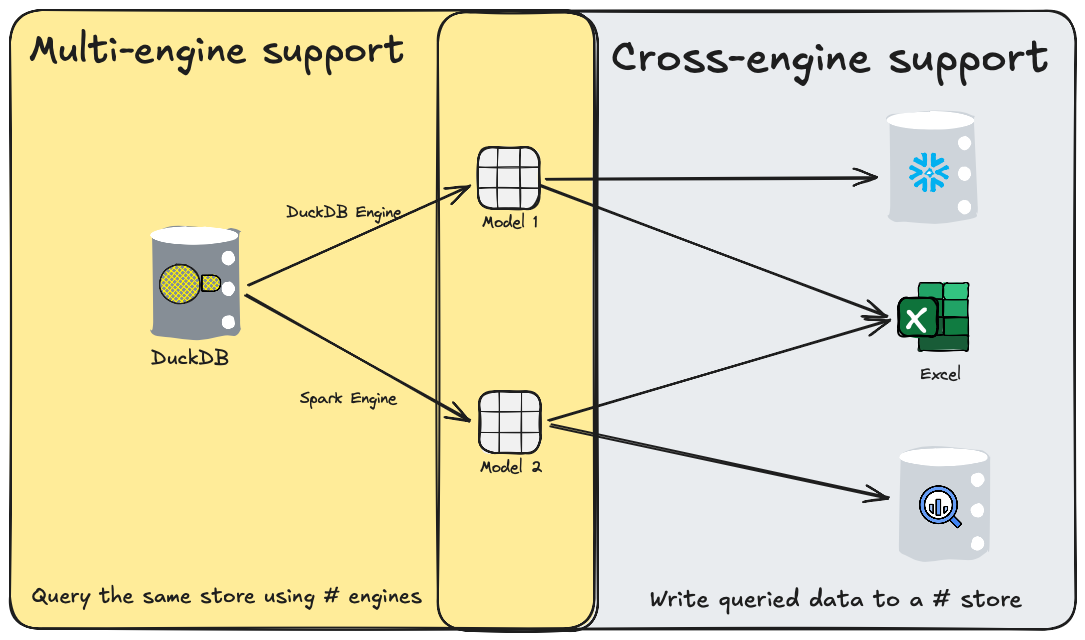
Starlake allows you to define a default engine for your entire project, while also giving you the flexibility to override it on a per-model basis.
For example, in load tasks, you can choose to use the native data warehouse engine for simple loading operations, while leveraging Spark for more complex tasks—such as processing XML files or performing advanced validations like custom attribute checks or transformations during the load process.
Starlake is also cross-engine capable: it enables transformations that query one data warehouse and write results to another. This is especially useful for export tasks to formats like CSV, Parquet, or Excel, as well as for integrations with external analytical or operational databases.
## Code-free Orchestration
Starlake relieves you from writing any orchestrator code since it can watch the arrival of your files and infer the lineage from your SQL transform tasks, all you need is to select one of the predefined/custom orchestrator templates and let Starlake generate and deploy your DAGs on your selected orchestrator.
## Develop on DuckDB, deploy anywhere
With Starlake develop and test your load and transform tasks locally on DuckDB using you target datawarehouse SQL dialect thanks to Starlake SQL Transpiler.
1. Reduce costs
2. Faster development cycles
3. Test you load and transform on your CI before deployment
4. Share and publish unit-test reports