Kafka Ingestion & Offloading
Starlake supports Apache Kafka as both a source (consuming messages into tables) and a sink (publishing data to topics). Two execution modes are available: batch and streaming.
1. Connection Configuration
A Kafka connection is defined in the connections section with bootstrap servers and an optional schema registry URL.
connections:
  my-kafka:
    type: KAFKA
    options:
      bootstrapServers: "localhost:9092"
      schemaRegistryUrl: "http://localhost:8081"
2. Batch Mode
In batch mode, the Kafka loader runs on a schedule. Offsets are tracked in the comet_offsets topic (or on the filesystem when comet-offsets-mode = "FILE"), so each run picks up exactly where the previous one left off.
Topic offsets (default):

- Read last consumed offset from
comet_offsets_topic. - Move consumer to that offset.
- Read up to the last produced message.
- Store messages in file(s).
- Save last consumed offset back to
comet_offsets_topic.
File-based offsets (comet-offsets-mode = "FILE"):
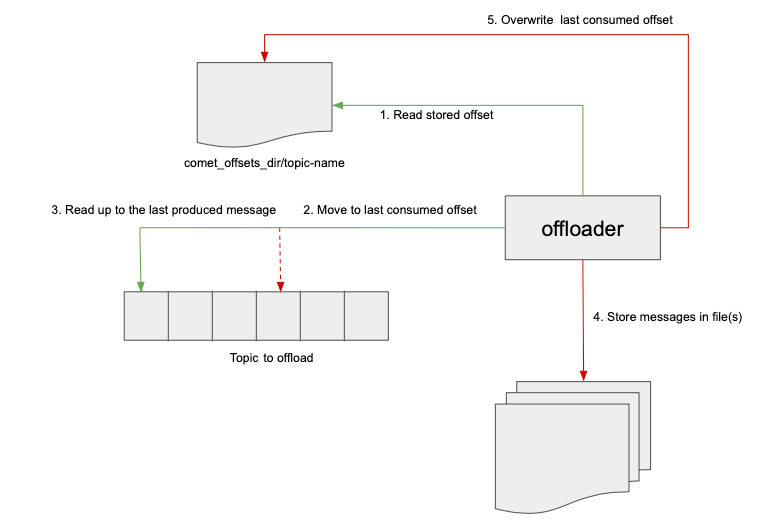
- Read stored offset from
comet_offsets_dir/topic-name. - Move consumer to that offset.
- Read up to the last produced message.
- Store messages in file(s).
- Overwrite last consumed offset on disk.
When offloading to a file, use --write-coalesce to control the number of output partitions. Coalescing to a single partition writes to the exact filename specified in --write-path.
3. Streaming Mode
In streaming mode, the loader runs continuously. Offset management is handled by Kafka consumer groups — there is no comet_offsets topic involvement. You specify the consumer group ID in the topic's access options.
starlake kafkaload \
  --config my-topic \
  --stream true \
  --streaming-trigger ProcessingTime \
  --streaming-trigger-option "10 seconds" \
  --streaming-to-table my_database.events
Supported triggers:
| Trigger | Description |
|---|---|
Once | Process all available data then stop |
ProcessingTime | Micro-batch at a fixed interval (e.g., 10 seconds) |
Continuous | Low-latency continuous processing |
4. Serialization Formats
Messages can be serialized/deserialized as:
- JSON: human-readable, schema-flexible
- Avro: compact binary format, integrated with Schema Registry
The format is controlled via the --format (read) and --write-format (write) options.
5. Topic-to-Table Loading (Kafka as Source)
Consume messages from a Kafka topic and load them into a target table. This is the default direction when using kafkaload.
starlake kafkaload \
  --config my-topic \
  --connectionRef my-kafka \
  --format json \
  --write-mode APPEND
The consumed data passes through the same validation pipeline as file-based ingestion:
- Type validation against the schema
- Required field checks
- Privacy transformations
- Computed columns (
script) - Rejection routing to
audit.rejected
6. Table-to-Topic Offloading (Kafka as Sink)
Publish data from a file or table to a Kafka topic by specifying --write-format kafka and a write configuration.
starlake kafkaload \
  --config my-topic \
  --path /data/events.parquet \
  --write-config my-output-topic \
  --write-format kafka
7. Message Transformation
The --transform option applies a SQL transformation to each message before loading or offloading. This allows filtering, reshaping, or enriching messages in-flight.
starlake kafkaload \
  --config my-topic \
  --transform "SELECT user_id, event_type, timestamp FROM message WHERE event_type != 'heartbeat'"
8. Partitioning
When streaming to a table, the --streaming-partition-by option specifies columns used to partition the output data.
starlake kafkaload \
  --config my-topic \
  --stream true \
  --streaming-to-table events \
  --streaming-partition-by "event_date,region"
9. Write Modes
The --write-mode option controls how offloaded data is stored on disk:
| Mode | Description |
|---|---|
APPEND | Add new data to existing files |
OVERWRITE | Replace existing data |
IGNORE | Skip if data already exists |
ERROR_IF_EXISTS | Fail if data already exists |
10. Spark Options Pass-Through
Additional Spark reader/writer options can be passed via --options (read) and --write-options (write) for advanced Kafka consumer/producer configuration (e.g., max.poll.records, session.timeout.ms).
starlake kafkaload \
  --config my-topic \
  --options "max.poll.records=1000,session.timeout.ms=30000"
Summary
| Capability | Mode |
|---|---|
Topic-based offset tracking (comet_offsets) | Batch |
File-based offset tracking (comet-offsets-mode = "FILE") | Batch |
| Consumer group offset management | Streaming |
| JSON serialization | Both |
| Avro serialization (Schema Registry) | Both |
| Topic-to-table loading | Both |
| Table/file-to-topic offloading | Both |
Message transformation (--transform) | Both |
Output partitioning (--streaming-partition-by) | Streaming |
Output coalescing (--write-coalesce) | Batch |
| Trigger modes (Once, ProcessingTime, Continuous) | Streaming |
| Spark options pass-through | Both |