Test Transform Tasks
Starlake transform tests validate SQL transformations locally on DuckDB with automatic dialect transpilation from BigQuery, Snowflake, or Databricks. Provide source data files and expected output (CSV or SQL), and Starlake compares schema and results. No query modification needed -- Starlake transpiles your production SQL automatically.
For an overview of the testing approach and DuckDB transpilation, see Unit Testing Concepts. For data loading tests, see Test Load Tasks.
How to write a transform test
- Create the test directory -- Add a directory under
metadata/tests/transform/{domain}/{table}/test-name. - Add source data files -- Place CSV or JSONL files named
domain.table.csv(or.json) for each table referenced by the transformation. - Define expected output -- Add
_expected.csv(static data) or_expected.sql(SQL query whose result is compared). - Run the test -- Execute
starlake test --transformorstarlake test --domain <domain> --table <table> --test <test-name>.
Test directory structure
Transform tests reside in metadata/tests/transform. Each test is a directory inside the domain/table subdirectory.
A test directory contains:
- Source data files -- CSV or JSONL files with initial data for every table referenced by the SQL transformation. Name each file after its domain and table:
starbake.product.jsonorstarbake.product.csv. - Expected output -- Either:
_expected.csv-- Static expected data in CSV format._expected.sql-- A SQL query whose result is compared to the actual transformation output.
How validation works
Before running the transformation, Starlake transpiles your SQL statements from the target dialect to the DuckDB dialect.
After executing the transpiled SQL against a local DuckDB database populated with the test source data, Starlake:
- Compares the table schema with the expected data schema.
- Compares the actual transformation results with the expected output.
The test passes if both schema and data match. Any mismatch raises an error.
Test reports
Reports for a test named test-name are stored in test-reports/transform/test-name/ and contain:
testname.db-- The DuckDB database after the transform task runs, containing:sl_expected-- The expected data.domain.table(e.g.,starbake.product) -- The actual transformed data.sl_expectations-- Results of any expectation related to this table.audit.audit-- The audit log of the transform task.
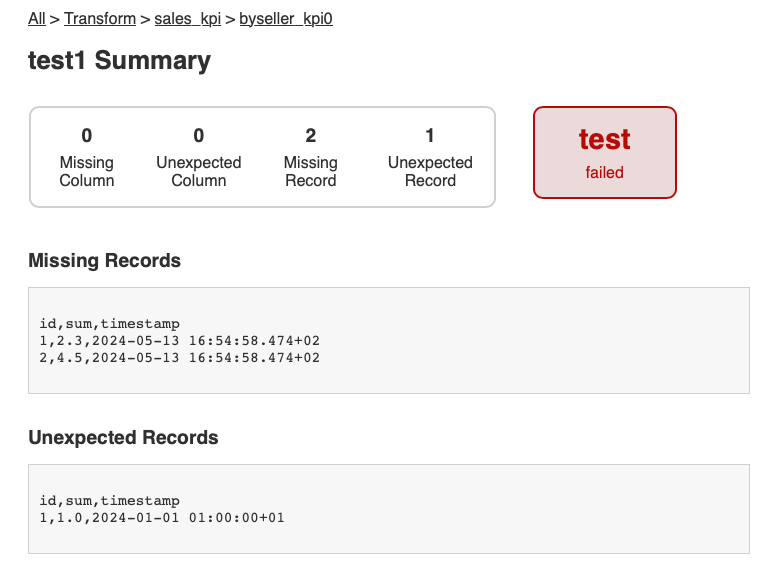
not_expected.csv-- Rows in the actual table that are not in the expected data.missing.csv-- Rows in the expected data that are missing from the actual table.
Running transform tests
Run all transform tests (skip load tests):
starlake test --transform
Run a specific test:
starlake test --domain starbake --table product --test test-name
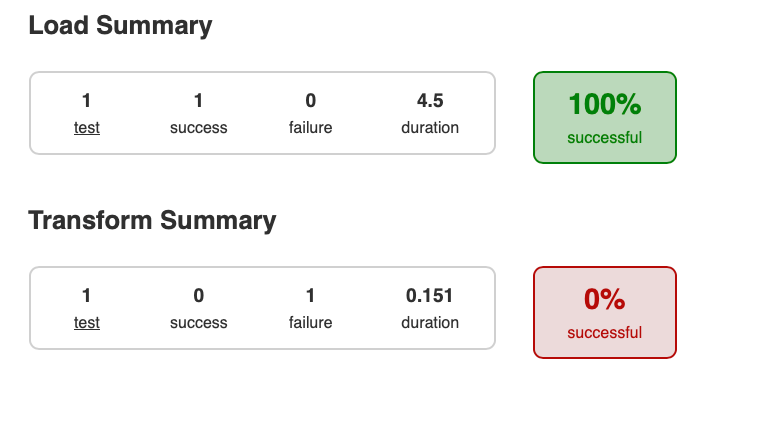
Running tests also generates a complete HTML report website in the test-reports directory.
Example: Transform test report
Example: Combined load and transform report
Frequently Asked Questions
Where to place transform tests in Starlake?
Transform tests are in metadata/tests/transform. Each test is a directory in the domain/table subdirectory.
What files make up a transform test?
CSV or JSONL files containing initial source data (named domain.table.csv or .json), and a _expected.csv or _expected.sql file containing the expected data after transformation.
How does Starlake handle SQL dialect differences?
Starlake automatically transpiles SQL queries from the target dialect (BigQuery, Snowflake, etc.) to the DuckDB dialect before execution. No query modification is needed.
Can I use a SQL file as expected output?
Yes. The expected file can be _expected.csv (static data) or _expected.sql (a SQL query whose result is compared to the actual data).
Where to find transform test reports?
In test-reports/transform/test-name/. The report contains the DuckDB database (testname.db), unexpected data (not_expected.csv), and missing data (missing.csv).
How to run only transform tests?
Use the command starlake test --transform. For a specific test: starlake test --domain <domain> --table <table> --test <test-name>.
Do tests generate a visual report?
Yes. Running tests generates a complete website in the test-reports directory.