Customization
Starlake comes with built-in DAG templates that work out of the box. This page covers how to customize these templates, inject parameters at runtime, and manage task dependencies.
You just need to be comfortable with Jinja2 templating and Python to customize DAG generation.
Architecture overview
The orchestration library is organized around a factory pattern:
IStarlakeJob (generic interface)
├── StarlakeAirflowJob (Airflow base)
│   ├── StarlakeAirflowBashJob       ← shell execution
│   ├── StarlakeAirflowCloudRunJob   ← GCP Cloud Run
│   ├── StarlakeAirflowDataprocJob   ← GCP Dataproc
│   └── StarlakeAirflowFargateJob    ← AWS Fargate
├── StarlakeDagsterJob (Dagster base)
│   ├── StarlakeDagsterShellJob      ← shell execution
│   ├── StarlakeDagsterCloudRunJob   ← GCP Cloud Run
│   ├── StarlakeDagsterDataprocJob   ← GCP Dataproc
│   └── StarlakeDagsterFargateJob    ← AWS Fargate
└── StarlakeSnowflakeJob             ← Snowflake native SQL
The appropriate class is instantiated automatically based on the template you choose. The StarlakeJobFactory discovers and registers all implementations via a plugin-based registry.
Core methods
Every factory class provides these methods for generating orchestrator tasks:
| Method | Description | Starlake command |
|---|---|---|
sl_import(task_id, domain, tables) | Import/stage data from the landing area | starlake stage |
sl_pre_load(domain, tables, pre_load_strategy) | Check pre-load conditions | starlake preload |
sl_load(task_id, domain, table, spark_config, dataset) | Load a table | starlake load |
sl_transform(task_id, transform_name, transform_options, spark_config, dataset) | Run a transformation | starlake transform |
sl_job(task_id, arguments, spark_config, dataset, task_type) | Generic command (used internally by the above) | any starlake command |
Templates
Built-in templates
Templates are in the src/main/resources/templates/dags resource directory, organized by operation type.
Load templates
- Airflow
- Dagster
- Snowflake Tasks
| Template | Execution environment | Factory class |
|---|---|---|
load/airflow_scheduled_table_bash.py.j2 | Shell/Bash | StarlakeAirflowBashJob |
load/airflow_scheduled_table_cloud_run.py.j2 | GCP Cloud Run | StarlakeAirflowCloudRunJob |
load/airflow_scheduled_table_dataproc.py.j2 | GCP Dataproc | StarlakeAirflowDataprocJob |
load/airflow_scheduled_table_fargate.py.j2 | AWS Fargate | StarlakeAirflowFargateJob |
| Template | Execution environment | Factory class |
|---|---|---|
load/dagster_scheduled_table_shell.py.j2 | Shell | StarlakeDagsterShellJob |
load/dagster_scheduled_table_cloud_run.py.j2 | GCP Cloud Run | StarlakeDagsterCloudRunJob |
load/dagster_scheduled_table_dataproc.py.j2 | GCP Dataproc | StarlakeDagsterDataprocJob |
load/dagster_scheduled_table_fargate.py.j2 | AWS Fargate | StarlakeDagsterFargateJob |
| Template | Execution environment | Factory class |
|---|---|---|
load/snowflake_load_sql.py.j2 | SQL (native) | StarlakeSnowflakeJob |
Transform templates
- Airflow
- Dagster
- Snowflake Tasks
| Template | Execution environment | Factory class |
|---|---|---|
transform/airflow_scheduled_task_bash.py.j2 | Shell/Bash | StarlakeAirflowBashJob |
transform/airflow_scheduled_task_cloud_run.py.j2 | GCP Cloud Run | StarlakeAirflowCloudRunJob |
transform/airflow_scheduled_task_dataproc.py.j2 | GCP Dataproc | StarlakeAirflowDataprocJob |
transform/airflow_scheduled_task_fargate.py.j2 | AWS Fargate | StarlakeAirflowFargateJob |
| Template | Execution environment | Factory class |
|---|---|---|
transform/dagster_scheduled_task_shell.py.j2 | Shell | StarlakeDagsterShellJob |
transform/dagster_scheduled_task_cloud_run.py.j2 | GCP Cloud Run | StarlakeDagsterCloudRunJob |
transform/dagster_scheduled_task_dataproc.py.j2 | GCP Dataproc | StarlakeDagsterDataprocJob |
transform/dagster_scheduled_task_fargate.py.j2 | AWS Fargate | StarlakeDagsterFargateJob |
| Template | Execution environment | Factory class |
|---|---|---|
transform/snowflake_scheduled_transform_sql.py.j2 | SQL (native) | StarlakeSnowflakeJob |
Custom templates
You can create custom templates that extend the built-in ones. Place them in ${SL_ROOT}/metadata/dags/templates/.
A custom template typically:
- Defines custom variables (e.g.,
jobs,user_defined_macros) - Includes the built-in template via a Jinja2
{% include %}statement
{% include 'dags/templates/__custom_jobs.py.j2' %}
{% include 'templates/dags/transform/airflow_scheduled_task_cloud_run.py.j2' %}
Then reference it in your DAG configuration:
dag:
  comment: "Custom transform DAG"
  template: "custom_scheduled_task_cloud_run.py.j2"
  filename: "{{domain}}_custom_tasks.py"
  options:
    cloud_run_project_id: "my-project"
    cloud_run_job_name: "starlake-transform"
Runtime customization
Transform parameters
Data transformations often require parameterized SQL queries whose parameters should be evaluated at runtime.
SELECT * FROM orders
WHERE extraction_date >= '{{date_param_min}}' AND extraction_date <= '{{date_param_max}}'
The jobs variable
All transform DAG templates support a dictionary variable named jobs. Each key is a transformation name and its value contains the parameters to pass.
jobs = {
    "Products.TopSellingProducts": {
        "options": "date_param_min=2024-01-01,date_param_max=2024-12-31"
    },
    "Products.MonthlySalesPerProduct": {
        "options": "start_day=1"
    }
}
The jobs dict is merged with options when the factory class is instantiated:
sl_job = StarlakeAirflowCloudRunJob(
    options=dict(options, **sys.modules[__name__].__dict__.get('jobs', {}))
)
Inside sl_transform, each transform looks up its own key to find additional options:
# From IStarlakeJob.sl_transform():
additional_options = self.__class__.get_context_var(
    transform_name, {}, self.options
).get("options", "")
Airflow user-defined macros
Because transform parameters may depend on Airflow context variables, you can define user-defined macros that are evaluated at runtime.
from custom import get_days_interval, get_month_period

user_defined_macros = {
    "days_interval": get_days_interval,
    "month_period": get_month_period
}

jobs = {
    "Products.TopSellingProducts": {
        "options": "{{ days_interval(data_interval_end | ds, var.value.get('TOP_SELLING_PRODUCTS_DELTA', '30')) }}"
    }
}
The user_defined_macros dict is picked up automatically by the generated DAG:
with DAG(
    dag_id=...,
    user_defined_macros=sys.modules[__name__].__dict__.get('user_defined_macros', None),
    ...
) as dag:
Terraform integration
A best practice is to inject jobs via Terraform variables, keeping your templates environment-agnostic.
import json
jobs = json.loads("""${jobs}""")
variable "jobs" {
  type = list(object({
    name    = string
    options = string
  }))
  default = []
}
locals {
  jobs = tomap({
    for job in var.jobs :
      "${job.name}" => {options = job.options}
  })
}

resource "google_storage_bucket_object" "composer_dags" {
  for_each = local.dag_files
  name     = each.value
  content  = templatefile(
    "${path.module}/${each.value}",
    merge(local.variables, {jobs = jsonencode(local.jobs)})
  )
  bucket   = var.composer_bucket
}
jobs = [
    {
        name    = "Products.TopSellingProducts"
        options = "{{ days_interval(data_interval_end | ds, var.value.get('TOP_SELLING_PRODUCTS_DELTA', '30')) }}"
    },
    {
        name    = "Products.MonthlySalesPerProduct"
        options = "{{ month_period(data_interval_end | ds, var.value.get('SALES_START_DAY', '1')) }}"
    }
]
Dependencies
Starlake analyzes SQL queries to compute the full dependency tree for every transformation. The run_dependencies_first option controls how these dependencies are handled.
All dependencies are available in the generated DAG via the task_deps Python variable:
task_deps = json.loads("""[{
  "data": {
    "name": "Customers.HighValueCustomers",
    "typ": "task",
    "parent": "Customers.CustomerLifeTimeValue",
    "parentTyp": "task",
    "sink": "Customers.HighValueCustomers"
  },
  "children": [{
    "data": {
      "name": "Customers.CustomerLifeTimeValue",
      "typ": "task",
      "parent": "starbake.Customers",
      "parentTyp": "table",
      "sink": "Customers.CustomerLifeTimeValue"
    },
    "children": [
      {"data": {"name": "starbake.Customers", "typ": "table"}, "task": false},
      {"data": {"name": "starbake.Orders", "typ": "table"}, "task": false}
    ],
    "task": true
  }],
  "task": true
}]""")
Inline strategy
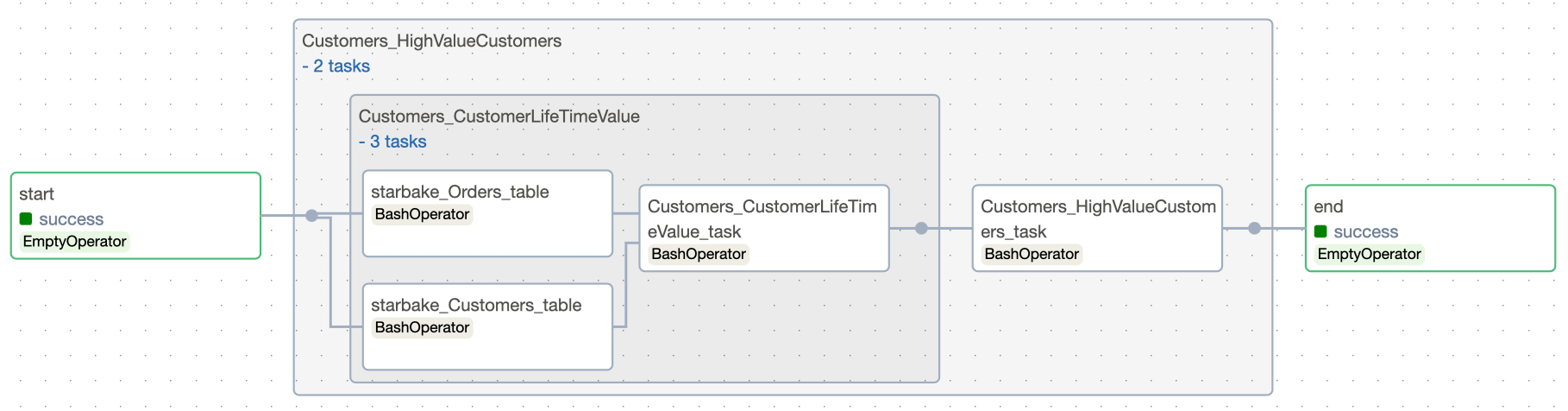
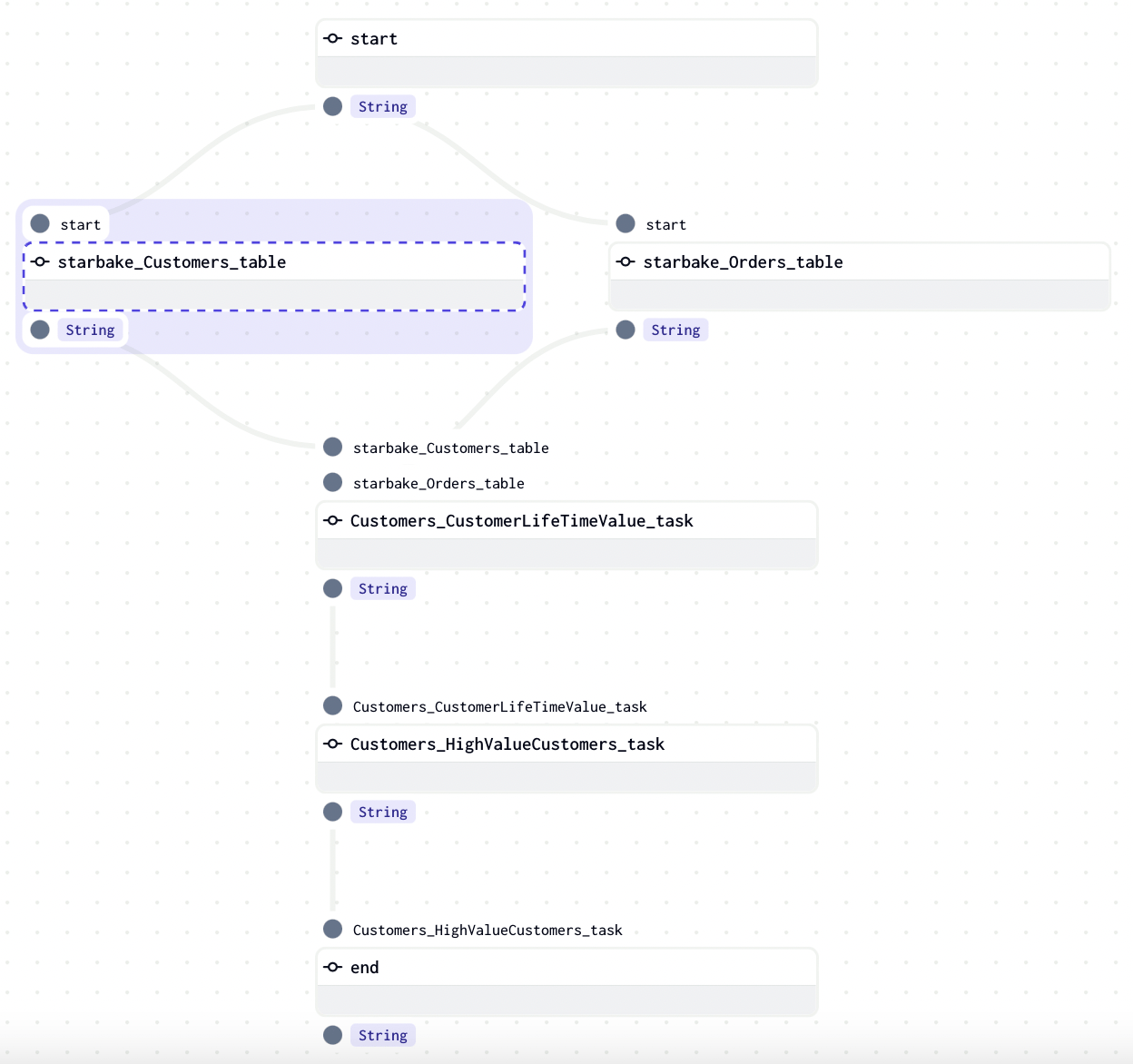
When run_dependencies_first = true, all dependencies are generated as tasks within the same DAG.
This creates a self-contained DAG that runs the entire pipeline (loads + transforms) in the correct order.
- Airflow
- Dagster
External state change strategy
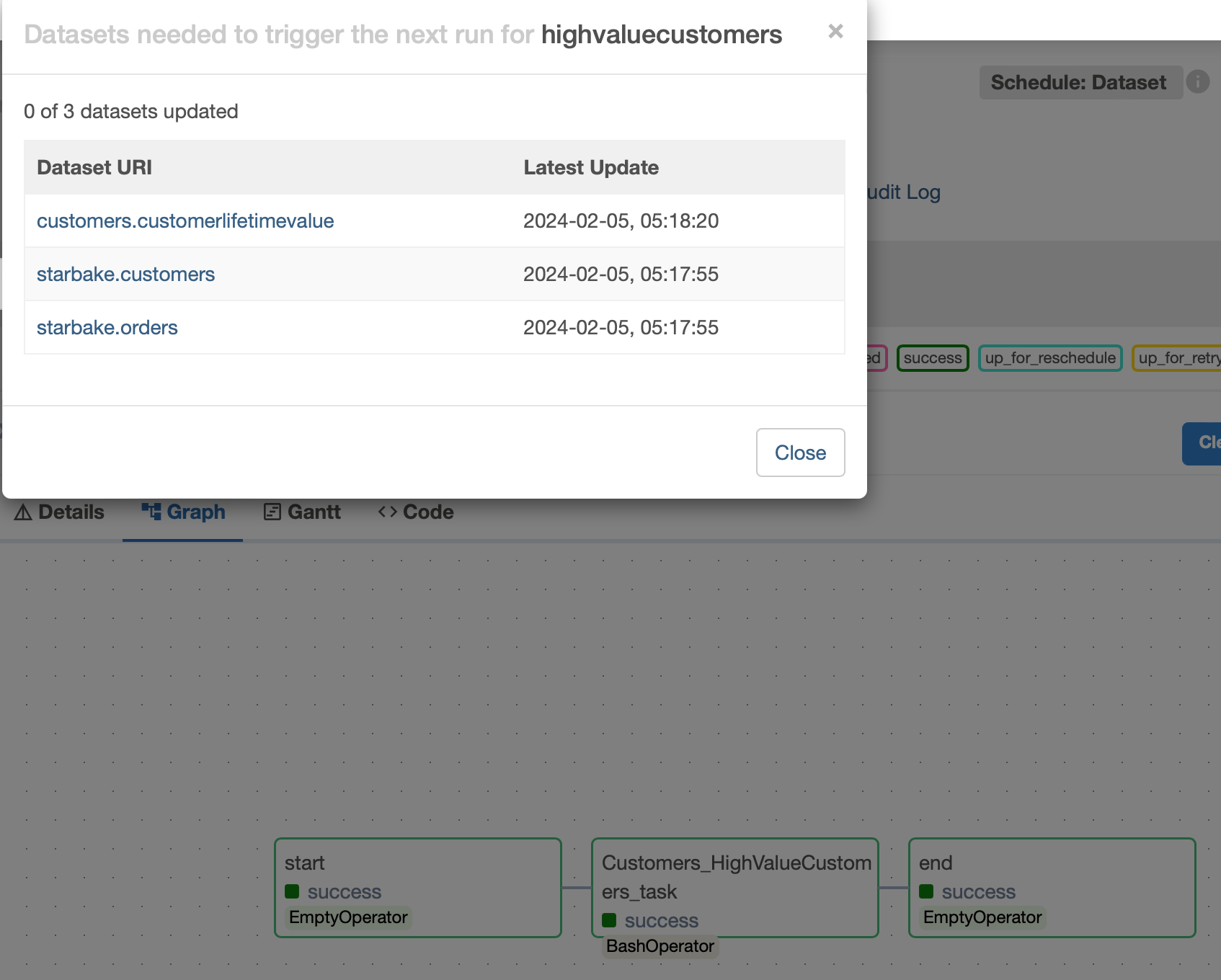
When run_dependencies_first = false (the default), the orchestrator's native data-aware scheduling mechanism is used. The transform DAG only runs when its upstream dependencies have been satisfied.
- Airflow
- Dagster
A schedule is created using Airflow Assets (formerly Datasets). Each upstream load and transform updates its corresponding Asset, and the transform DAG is triggered when all required Assets are fresh.
Each starlake command records its outlets (output Assets). At the end of the DAG, all outlets are updated:
end = sl_job.dummy_op(
    task_id="end",
    outlets=[Dataset(dag.dag_id)] + list(map(lambda x: Dataset(x.uri), sl_job.outlets))
)
The dataset_triggering_strategy option controls how multiple upstream Assets are combined:
any— Any single Asset update triggers the DAGall— All Assets must be updated- Custom boolean expression (e.g.,
dataset1 & (dataset2 | dataset3))
A MultiAssetSensor monitors upstream Asset materializations. When all required Assets are materialized, a run is triggered.
Each starlake command materializes its corresponding Asset at runtime through AssetMaterialization.
The sensor checks every 60 seconds by default:
sensor = MultiAssetSensorDefinition(
    name=f'{job_name}_sensor',
    monitored_assets=list(map(lambda asset: AssetKey(asset), assets)),
    asset_materialization_fn=multi_asset_sensor_with_skip_reason,
    minimum_interval_seconds=60,
    description=f"Sensor for {job_name}",
    job_name=job_name,
)